Best CAD Software for Jewelry Design in 2026: Free vs Paid
The best CAD software for jewelry design compared: MatrixGold, Rhino, 3Design, Firestorm, and the free options, with real prices and what each suits.
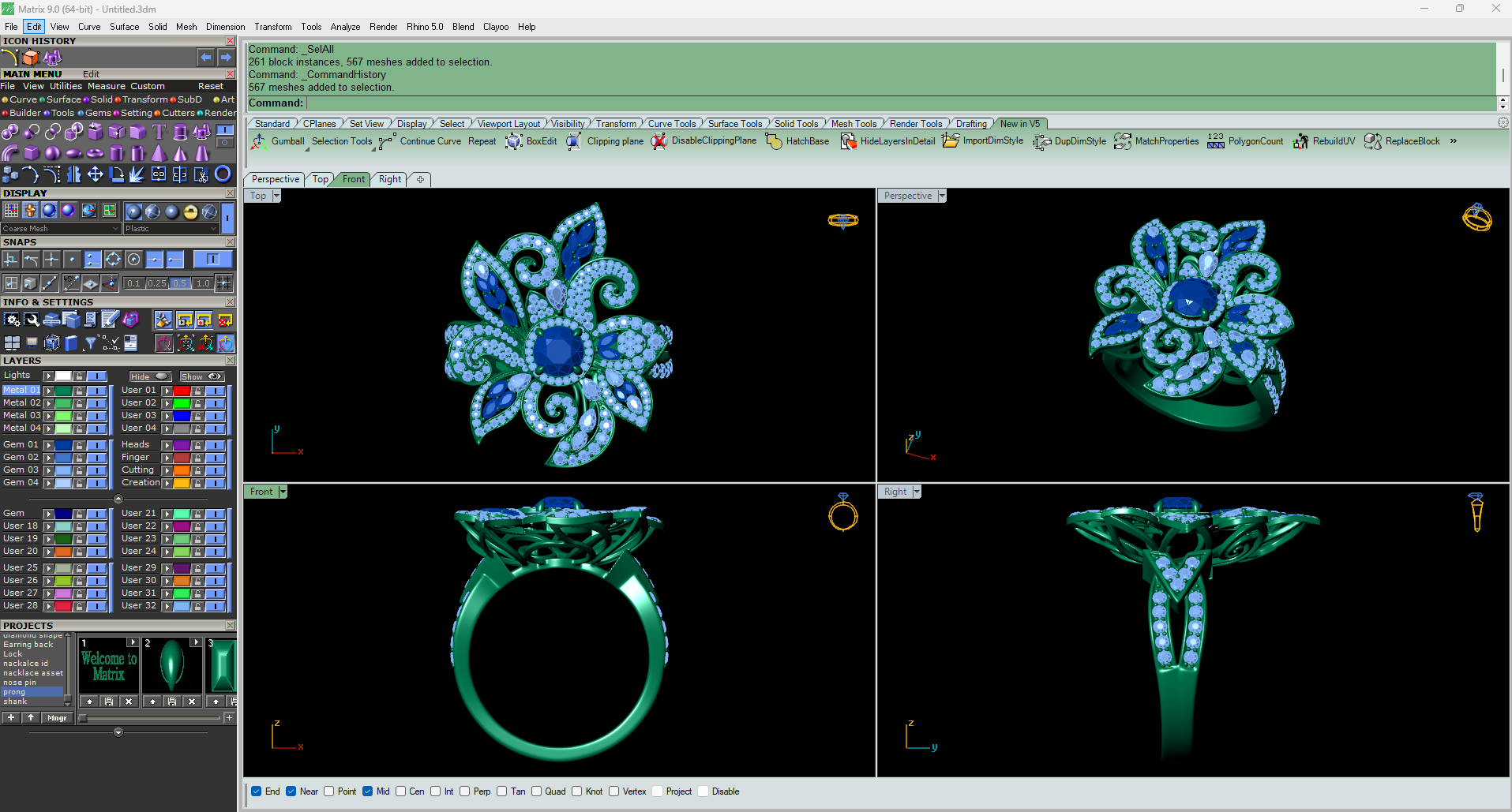
The best CAD software for jewelry design in 2026 is Rhino and MatrixGold with a jewelry plugin if you want the trade standard, 3Design if you want a jewelry-only program that owes nothing to Rhino, and Blender if the budget is zero and the time is not. MatrixGold is the fastest route to a production-ready ring and the most expensive way to get there. Free options are real, but one of the popular ones is not free for anyone running a jewelry business.
Here is what separates them, and what your choice does to everything downstream.
What Each Program Is Actually Built On?
Most rankings of the best CAD software for jewelry design line up five prices and let you pick the one you can afford. That is the wrong comparison, because two of the programs on every list cannot run on their own.
|
Program |
What it runs on |
Price |
What it suits |
|---|---|---|---|
|
Rhino 8 |
Nothing else |
$995, perpetual |
The trade standard, and the base other tools sit on |
|
MatrixGold |
Rhino |
$5,995 with Rhino 8 included |
Production-ready rings and settings, quickly |
|
3Design V13 |
Nothing else |
Not published |
Jewelers who want a parametric jewelry-only program |
|
Firestorm |
Nothing else |
Not published |
Direct modeling from a large component library |
|
Blender |
Nothing else |
Free |
Zero budget and time to spend |
|
Fusion, personal |
Nothing else |
Free, with a condition |
Precise parametric work, non-commercial only |
MatrixGold is a plugin, not a program. Stuller states it plainly: "MatrixGold requires a Rhino license to operate." The $5,995 package on Stuller's MatrixGold page includes a Rhinoceros 8 license for that reason, so a reader comparing it against Rhino's $995 is comparing a house against its foundation. Gemvision released MatrixGold 4.0 in May 2026, while the bundle Stuller sells is built around MatrixGold 3, which is worth confirming before you pay.
Rhino is the layer almost everything else stands on. McNeel's store lists Rhino 8 at $995 commercial and $195 educational, and the licenses are perpetual: "All purchased licenses are permanent and do not expire. There are no maintenance fees." McNeel's own jewelry page names CrossGems, MatrixGold, CounterSketch, Pro-J, and RhinoArtisan as the jewelry tools built on top of it. Rhino alone has no stone setting, no prong builders, and no gem library. You get a very good surface modeler, and you build the jewelry logic yourself.
3Design is the one genuine alternative to that stack. It runs on an engine McNeel had no hand in, so it is not a plugin and it does not need Rhino underneath. It is parametric, meaning the design keeps a history you can reach back into and change a stone size without rebuilding the piece. The vendor is on V13 and publishes no price, which is the honest answer to anyone searching for one.
A caution before you buy Firestorm
Firestorm CAD is a standalone direct modeler with a component library its resellers put above 4,000 pieces, and it still turns up on every jewelry software list. It also has no reachable vendor site. On 7 September 2026, firestormcad.com redirected to a domain-for-sale listing, firestormcomputing.com did not resolve, and firestormcad.net served a broken certificate. A training course for it is still on sale.
None of that proves the software is gone, and no discontinuation has been announced. It does mean you should get a support commitment in writing before sending anyone money, which is not advice worth ignoring on a five-figure purchase.
Where AI CAD tools sit right now
Every "AI jewelry CAD" claim we could find in September 2026 came from the vendor selling the tool, and none of it has been checked by anyone independent. So take the numbers off the table and ask the only question that decides it: can a caster work from the file.
A jewelry model has to carry real stone seats at real millimeter sizes, prong geometry that holds a stone rather than resembling one, and wall thickness that survives casting. Generating a convincing shape is a different problem from generating a manufacturable one, and the gap between them is where the trade currently is. Try the tools on your own designs before you plan a workflow around them.
The seat under the girdle and the taper on each prong tip are the geometry a caster works from. They are also what a generated shape most often gets wrong.
What Free CAD Software For Jewelry Design Really Costs You
Free jewelry CAD is real, and one of the popular recommendations is not free for you.
Fusion, on the personal use license, is off limits to a jewelry business. Autodesk's own eligibility article restricts the free tier to home-based non-commercial projects, for individuals generating less than $1,000 annually, and specifically not for use in primary employment or a company environment. Read that against the person searching for free jewelry CAD software. If you sell more than $1,000 of jewelry in a year, you are outside the license, and the commercial subscription is the real price.
Blender is the free option with no condition attached. It is open source, commercial work is permitted, and nothing is withheld from the free version. What it costs is measured in weeks. Blender was built for meshes and animation rather than for millimeter-accurate manufacturing, so the parts jewelry needs most, stone seats and precise wall thickness, are the parts you have to impose on it yourself. Designers do this successfully. None of them do it in a fortnight.
TinkerCAD is a real tool for the wrong job. It is genuinely free and genuinely easy, and it builds shapes by combining solids. Simple bands and pendants are within reach. A four-prong seat under a 1.5 carat stone is not.
The pattern across all three: free software removes the license cost and leaves the two costs that were always larger, which are the months of practice and the risk of a file no manufacturer can use.
Your CAD Program Shows Up In The Render
This is the part of the decision that only becomes visible after the fact, and it is the reason we care which program a file came from.
Jewelry CAD splits into two kinds of geometry. Rhino, MatrixGold, 3Design, and Firestorm build NURBS surfaces, which are curves described by mathematics and stay curved at any magnification. Blender and ZBrush build meshes, which are flat triangles arranged to look curved.
That distinction survives into the export. A 3DM or STEP file carries the true surface. An STL file is a mesh format by definition, so an STL is already triangulated no matter which program produced it.
Here is what it does to an image. The moment a model is exported as a mesh, the smoothness of every curved surface is locked at whatever tessellation setting was ticked at export. Nothing downstream can recover it. At web thumbnail size you will never see it. At the 3000 x 3000 px we deliver, a coarse setting shows up in the two places jewelry can least afford it: the inside curve of a shank, and the outer edge of a bezel, where a continuous highlight breaks into a faint faceted line.
Across 12,000+ renders the pattern has been consistent. Files exported as 3DM or STEP arrive ready to light. Mesh exports arrive at whatever quality was chosen by someone who was thinking about 3D printing rather than about a macro image, and a clean file renders at base price while a broken one needs repair time first.
So if your work will end up as catalog images, export NURBS where you can, and when the format has to be STL, set the tolerance tighter than the printer needs.
A NURBS surface holds that highlight unbroken at any magnification. A coarse mesh export turns it into a chain of short flat segments.
Buy The Software, Or Hire The Modeling Out
The software price is the smallest number in this decision, and the one everyone anchors on.
Set it out honestly. Rhino is $995 once. MatrixGold with Rhino is $5,995 once. Neither figure includes the months before you are producing files a caster would accept, and nobody can quote you that number because it depends entirely on how much bench and design experience you already have. Anyone selling you a "learn jewelry CAD in 30 days" figure is selling the course.
Volume is the test, not price. If you are putting out new designs continuously, two or three a month or more, buy the software and learn it. At that rate you will iterate faster than any outside arrangement can turn around, and the license pays for itself on time saved rather than on fees avoided.
If you produce a handful of new pieces a year, the arithmetic never gets there. Modeling is a separate job with a separate fee, quoted per design, which is why modeling and rendering are two different purchases and why buying both from habit is the common mistake.
You should also know that we are not neutral here. We render, and we model for a fee when a client has no file, so we have a commercial interest in the outsourcing answer. Weigh the paragraph above accordingly. What is not a judgment call: once a model exists, 3D jewelry rendering is a separate and much smaller purchase, at a flat $15 per CAD file for 9 HD images and 3 videos across rose, white, and yellow gold.
Where This Advice Does Not Hold
The software does not make the jeweler. A trained modeler in plain Rhino will produce a better ring than an untrained one in MatrixGold, every time, and the $5,995 does not close that gap. Most of what separates a good jewelry CAD file from a bad one is knowing what a stone seat has to do, which is bench knowledge, not software knowledge.
Two other cases where none of this applies. If your designs already exist as files, you do not need CAD software at all, and buying it is the expensive route to images you could order today. And if the piece exists in metal, in a case, in front of you, the answer is a photographer rather than any program on this page.
How To Choose In One Week
Start from what you already have rather than from a feature list.
If you own Rhino, install a jewelry plugin trial and model one full ring before you consider replacing anything. If you own nothing and have a budget, take the 3Design trial and a MatrixGold demo in the same week and build the same piece in both, because the difference between an engine you like and one you fight shows up in three days, not three months. If you own nothing and have no budget, install Blender and follow one jewelry-specific tutorial end to end before deciding whether the time cost is acceptable.
Then take whichever file you produce and have it rendered before you commit. A model that looks correct in a shaded viewport and falls apart under studio lighting is telling you something about your geometry that no software comparison can. Any studio confident in its work will render one piece to show you, which is a fair test to apply to a CAD trial as well.
Curious how this works in practice? See the process, browse the portfolio, check pricing, or see every service we run.